
Read, export, and delete inquiries
What arrives from the contact form is sent to you by email, and you can also read it in the admin. Inquiries are deleted 365 days after they arrive.
Before you begin
Section titled “Before you begin”- Your role can read inquiries. The site owner, and the owner and administrators of the admin, can read them.
Open the list
Section titled “Open the list”Open it in one of the following ways.
- In the top bar of the editor, press [問い合わせ](Inquiries).
- On the dashboard, press [問い合わせ](Inquiries) from the site’s menu (…).
The 「問い合わせ(サイトの名前)」(Inquiries (site name)) screen lists the date and time received, the name, the beginning of the message, and the page it was sent from. Inquiries whose notification email could not be sent are marked 「通知メールなし」(No notification email).
The [管理画面で見る](View in admin) link in the notification email opens that inquiry directly.
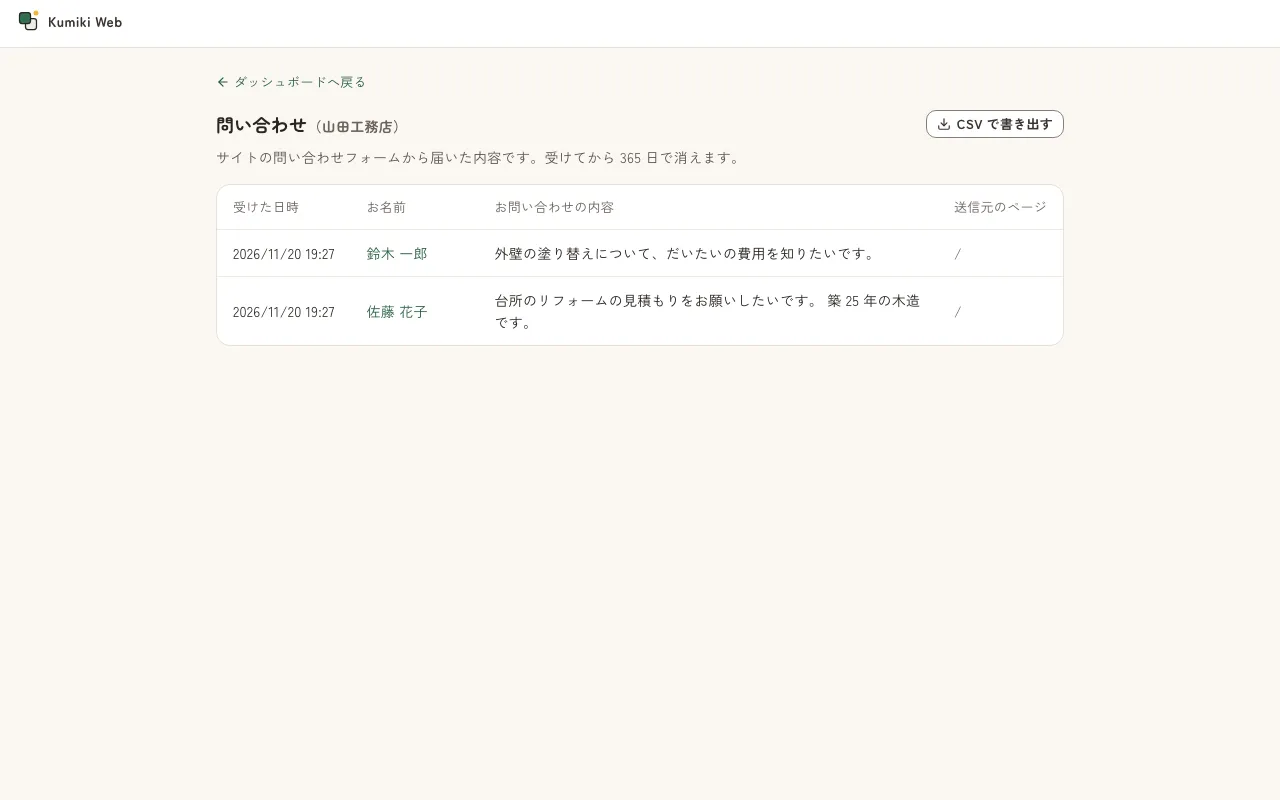
Read and reply to an inquiry
Section titled “Read and reply to an inquiry”- In the list, press the inquiry you want to read.
- Everything that was sent appears.
- To reply, press [メールで返信](Reply by email). Your email app opens.
 button](/_astro/forms-submission.BNyHIbfO_1CXceE.webp)
Export as CSV
Section titled “Export as CSV”On the list screen, press [CSV で書き出す](Export as CSV). All the inquiries that have arrived go into one CSV file. You can open it directly in Excel.
The CSV columns are the date and time received, the page it was sent from, whether the notification email was sent, and the content of each field.
Delete an inquiry
Section titled “Delete an inquiry”- Open the inquiry you want to delete.
- Press [この問い合わせを削除…](Delete this inquiry…).
- Press [削除する](Delete).
You cannot restore a deleted inquiry. 「問い合わせを 1 件削除しました。」(Deleted 1 inquiry.) appears in the list.
If something goes wrong
Section titled “If something goes wrong”- 「まだ問い合わせはありません」(No inquiries yet) appears: Publish the page with the form, and then wait for inquiries to arrive. See also Add a contact form.
- 「この問い合わせは見つかりません」(This inquiry cannot be found) appears: It was deleted, or it was removed because more than 365 days have passed since it was received.
- The notification email does not arrive: Check your spam folder. When a form receives many submissions, Kumiki Web stops notification emails for about 1 hour. When the number of emails that can be sent in a day is reached, no notification or automatic reply emails are sent for the rest of that day. In both cases, the inquiries are saved in the admin.